# I Made Claude Opus 4.8 Manage Another AI Agent While I Worked

> How I built a ticket-based workflow where Claude Opus 4.8 orchestrates OpenCode, cutting token waste while preserving review, visibility, and control.

*Published: June 6, 2026*

*Tags: AI, Claude Code, OpenCode, Agentic Engineering, Productivity*

---


Have you ever used your best AI model for work that clearly did not deserve your best AI model?

I have. Not because I did not understand model routing. I use cheaper models for cheaper tasks all the time. But when you are deep inside a real codebase, with tests failing, files changing, and context moving fast, it is easy to let your strongest session become the planner, executor, reviewer, secretary, and background worker at once.

That is where the token bill stops being a pricing problem and becomes a systems problem.

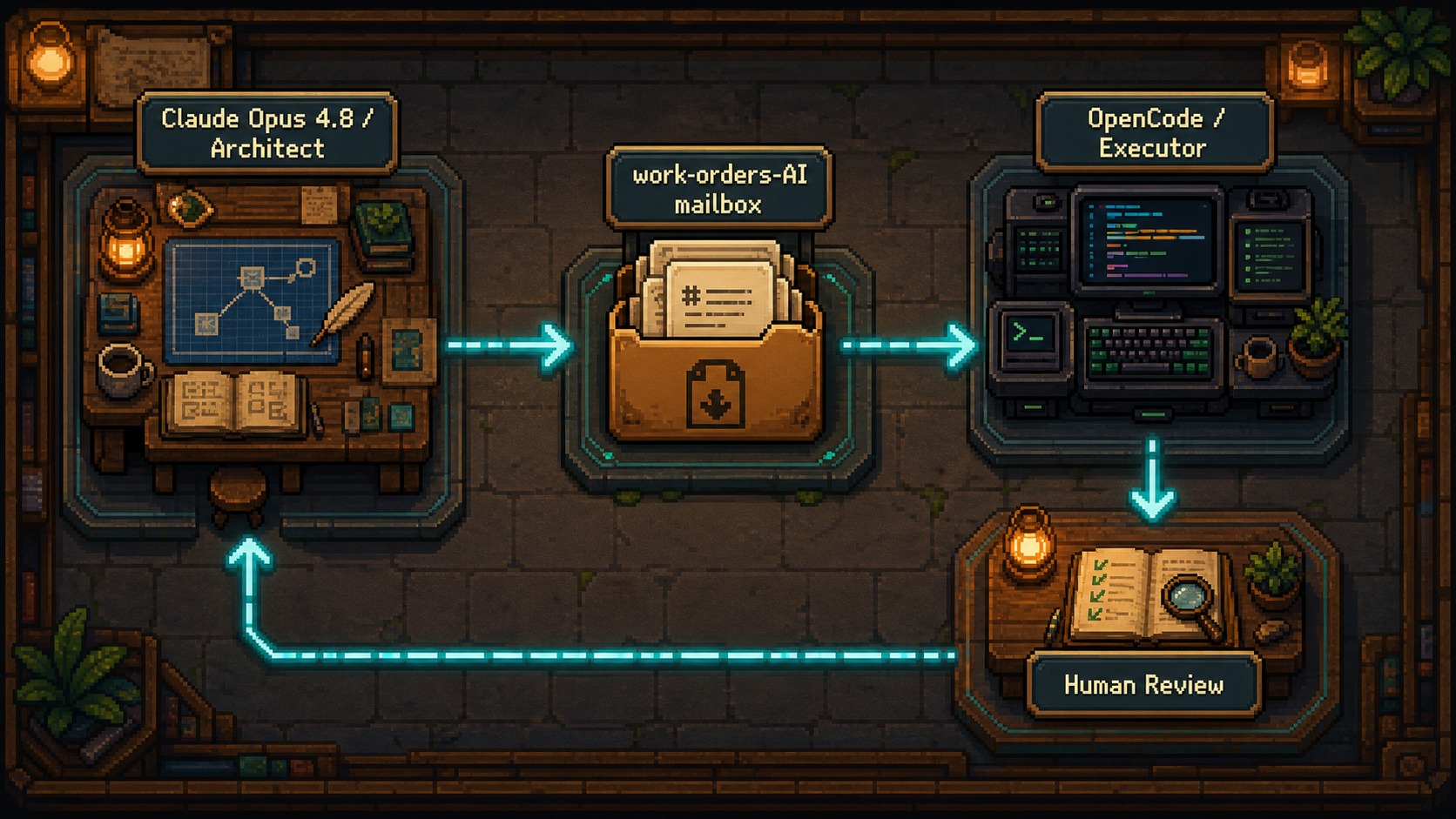
This week I rebuilt my workflow around a cleaner split: **Claude Opus 4.8 stays as the architect. OpenCode becomes the executor. The repository becomes the communication layer.**

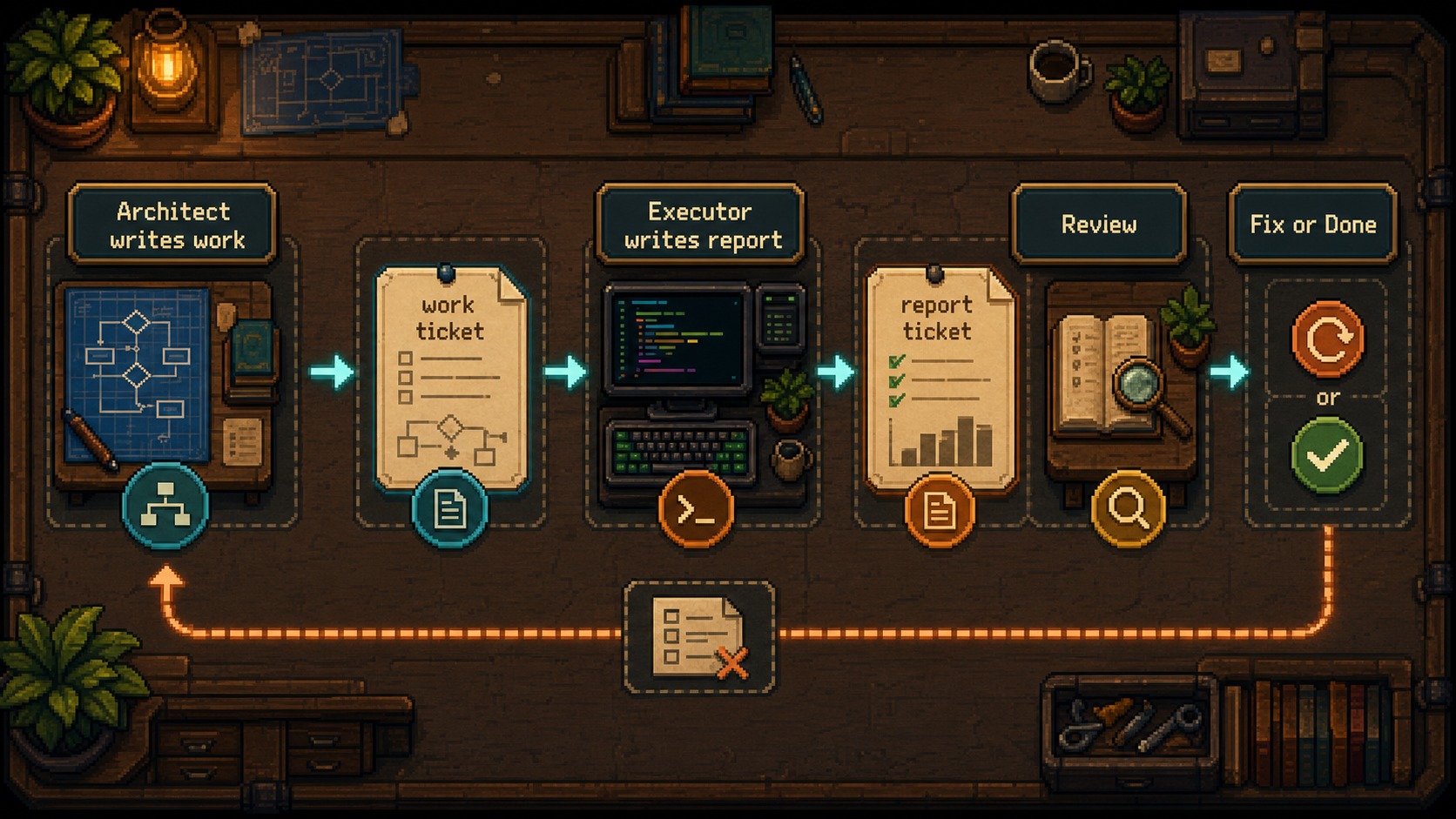
The result feels less like chatting with a single assistant and more like running a small technical team. Claude Opus 4.8 writes the work order. OpenCode executes it through a headless server. I attach to the OpenCode TUI so I can watch the work live. OpenCode writes a report. Claude Opus 4.8 wakes up, reviews the work, and decides whether to send another order or bring me back in.

No tmux. No model polling. No expensive architect sitting awake while another agent runs commands for an hour.

<figure><img src="/images/blog/claude-opencode-two-agent-workflow/claude-opencode-orchestration-map.jpg"
    alt="Architecture diagram showing Claude Opus 4.8 as architect, OpenCode as executor, a work-orders-AI folder as mailbox, and the human reviewing only after the loop stabilizes."><figcaption>
      <p>The core pattern: one expensive model makes architectural decisions, one cheaper executor performs scoped work, and files keep the contract durable.</p>
    </figcaption>
</figure>


---

## 1. The Real Problem Is Not Cost. It Is Role Confusion.

The obvious advice is "use the right model for the right task." That is correct, but incomplete.

In a real AI coding session, tasks do not arrive in neat categories. A single thread can include architectural decisions, file inspection, code generation, end-to-end testing, bug triage, deployment concerns, and writing status updates. If Claude Opus 4.8 handles all of that, the session gets expensive for reasons that have nothing to do with intelligence.

**First, premium reasoning gets spent on routine execution.** Claude Opus 4.8 is excellent for deciding what should happen. It does not need to be the model that renames files, applies obvious edits, or writes a mechanical report after every run.

**Second, execution noise fills the context.** Test logs, retries, shell output, failed patches, and intermediate reasoning all compete with the actual product decisions. The stronger the agent, the more tempting it is to let it keep going. That is how a clean architecture session turns into a messy terminal transcript.

**Third, the human becomes the message bus.** My first version was two terminals side by side inside VS Code. I would ask OpenCode to inspect something, wait for its report, copy the result to Claude Opus 4.8, ask for review, then carry the next instruction back to OpenCode. It worked, but I was routing packets by hand.

The workflow needed a protocol.

> [!important]
> The expensive part is not only the price of Claude Opus 4.8. The expensive part is asking the architect model to plan, execute, wait, review, and remember every intermediate detail in the same context.

The split is simple.

Claude Opus 4.8 owns the expensive thinking:

- Understand the repository.
- Decide what matters.
- Write scoped work orders.
- Review reports.
- Inspect risky files.
- Protect secrets, deployments, git operations, and production access.

OpenCode owns scoped execution:

- Read the work order.
- Modify only the requested files.
- Run the requested checks.
- Write a short report in the exact file Claude Opus 4.8 expects.

That separation changed both the cost and the ergonomics. I stopped asking one session to be everything.

---

## 2. The Architecture: Opus 4.8, OpenCode, and a File Mailbox

The system has three moving parts.

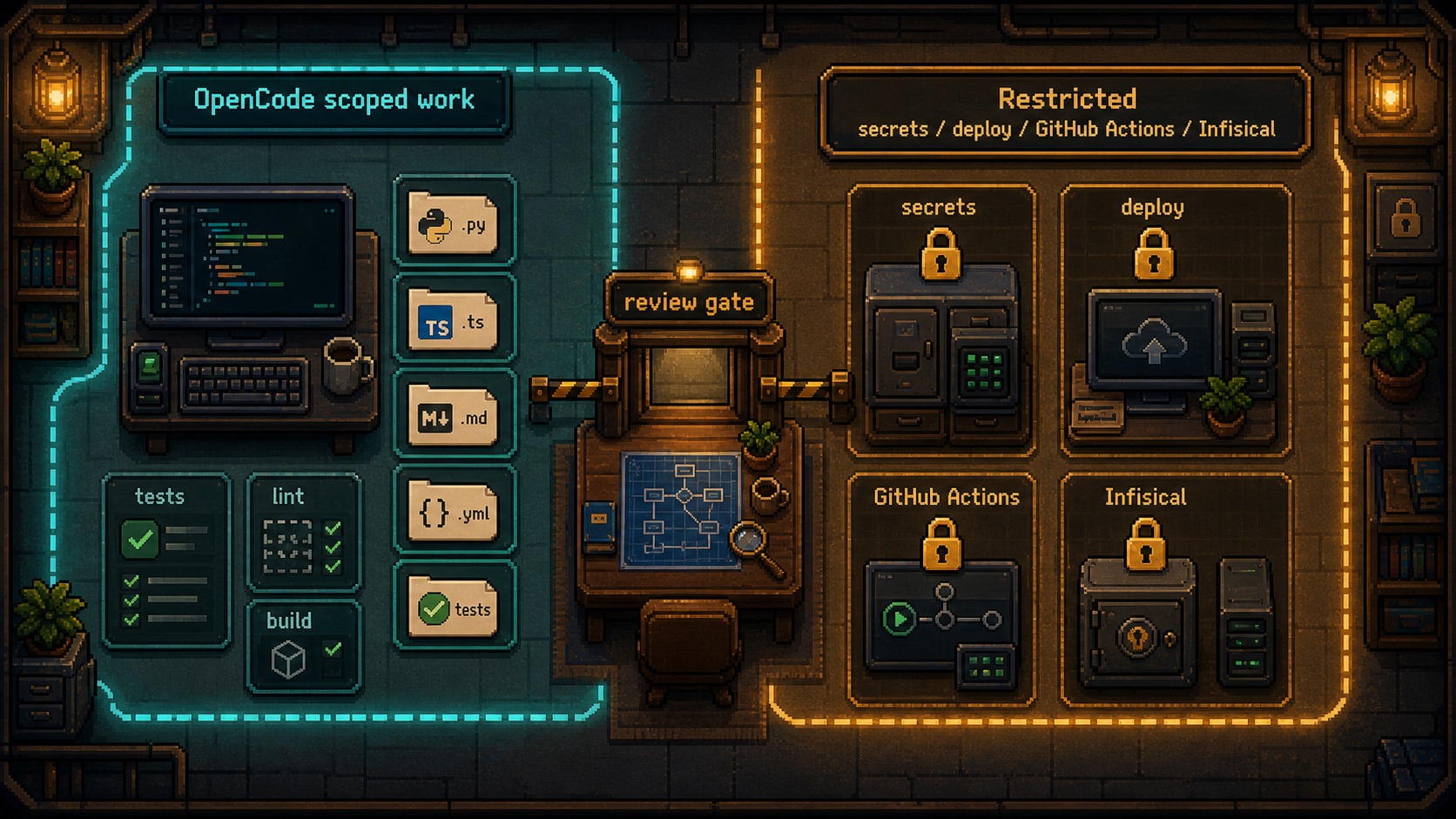
**Claude Opus 4.8 is the architect.** It owns judgment. It decides scope, defines success criteria, reviews implementation, and keeps the larger product intent in mind. In my setup, Claude Opus 4.8 is also the only agent allowed near sensitive areas: VPS access, deploy configuration, GitHub Actions, Infisical, and anything involving production credentials.

**OpenCode is the executor.** It runs through `opencode serve`, which starts a headless backend server. Then I connect to that server with `opencode attach`, so I still get the TUI. That part matters. You can run OpenCode fully headless if you want, but for vibe coders the TUI is a learning opportunity. You see what the executor is doing, where it hesitates, which files it opens, and how it interprets the order.

**The repo contains the mailbox.** A folder named `work-orders-AI/` stores every instruction and every report. The naming convention is deterministic:

```text
work-orders-AI/
  _state.json
  w01-work-contact-machine.md
  w02-report-contact-machine.md
  w03-work-contact-machine-fixes.md
  w04-report-contact-machine-fixes.md
```

The important invariant is not "odd numbers always belong to Claude Opus 4.8 and even numbers always belong to OpenCode." That is the happy path, and the skill template uses it because it keeps the workflow easy to read. In practice, the stronger rule is this:

**`work` files belong to Claude Opus 4.8. `report` files belong to OpenCode.**

Sometimes you need more than one work order in a row for a good reason: a correction, a narrowed task, a new scope boundary, or a recovery step. The number keeps the sequence. The `work` or `report` label defines ownership.

<figure><img src="/images/blog/claude-opencode-two-agent-workflow/ticket-lifecycle.jpg"
    alt="Sequence diagram showing Claude Opus 4.8 writing a work ticket, OpenCode producing a report ticket, Claude Opus 4.8 reviewing it, then either sending corrections or ending the task."><figcaption>
      <p>The ticket lifecycle replaces manual copy-paste between agents with a simple durable mailbox.</p>
    </figcaption>
</figure>


### The TUI Setup That Makes This Usable

The official OpenCode CLI docs show the pieces this workflow depends on: `opencode serve` starts a headless server, `opencode run --attach` can send work into that server, and `opencode attach [url]` attaches a terminal UI to a running backend.

My setup looks like this:

```bash
# Terminal 1: start the OpenCode backend
opencode serve --port 4096

# Terminal 2: attach the TUI so you can watch the executor live
opencode attach http://127.0.0.1:4096
```

Inside the OpenCode TUI, use `/sessions` to list and switch sessions. Current OpenCode docs list `/sessions` with `/resume` and `/continue` as aliases. If your installed version exposes `/session`, use the command your local build provides, but check the active session before assuming the TUI is showing the same run that Claude Opus 4.8 is dispatching into.

Then Claude Opus 4.8 can dispatch work into the same backend and session:

```bash
opencode run --attach http://127.0.0.1:4096 \
  -s <session_id> \
  --format json \
  -m <model> \
  "Read ./work-orders-AI/w01-work-contact-machine.md and execute it. Write your report in ./work-orders-AI/w02-report-contact-machine.md with that exact filename."
```

That gives you the best of both modes:

- OpenCode runs like an executor, not a chat you babysit.
- The TUI stays visible, which is valuable if you are learning.
- The report file becomes the durable checkpoint.
- Claude Opus 4.8 can review the result without you copying messages between terminals.

### Why Not Poll the Folder?

The obvious version is wrong: tell Claude Opus 4.8 to check the folder every few seconds until a report appears.

That is expensive. A model in a loop is still a model spending context and tokens. Polling sounds harmless when a script does it. Polling with an LLM in the loop is waste.

This gets worse with end-to-end testing. Claude Opus 4.8 loves E2E testing, and honestly, that instinct is good. Real products need tests that click through the actual flow. But token-wise, letting an expensive agent run E2E loops for an hour can be suicide. One flaky selector, one slow server, one auth problem, one modal blocking the page, and now you have several points of failure compounding into a huge transcript.

The better pattern is event-based: Claude Opus 4.8 launches OpenCode work, then stops spending attention. The shell process or harness can wait cheaply. The report file is the signal that the executor finished.

> [!warning]
> Do not build agent workflows where Claude Opus 4.8 watches another model work. If the architect is not making a judgment call, the architect should not be awake.

---

## 3. The Ticket Protocol That Keeps Both Agents Sane

The ticket system is intentionally boring. Each rule exists because ambiguity becomes expensive once two agents are involved.

**The filename declares the role.** `w01-work-contact-machine.md` is an instruction. `w02-report-contact-machine.md` is a report. The word `work` or `report` matters more than the number.

**The slug stays stable across a round.** If the work order is about `contact-machine`, the report should keep that slug. No creative filenames. No "final-report.md". No "done.md".

**The expected report filename is written inside the work order.** OpenCode should never infer where to report. Claude Opus 4.8 tells it the exact path.

**State lives in `_state.json`.** The state file stores the next ticket number, the OpenCode session id, the model, optional variant, and the local server URL.

```json
{
  "next_ticket": 1,
  "session_id": null,
  "model": "opencode/minimax-m3-free",
  "variant": null,
  "server_url": "http://127.0.0.1:4096"
}
```

A work order should read like a small contract:

```markdown
# W01 - Contact Machine

## Task
Review the contact workflow and implement the missing validation states.

## Requirements / Success Criteria
- [ ] Preserve the existing form structure.
- [ ] Add validation for missing email and message fields.
- [ ] Do not touch deployment, secrets, or GitHub Actions.
- [ ] Run the local validation command if available.

## Context
Relevant files:
- src/contact/form.ts
- src/contact/validation.ts

## Delivery
- Files to create/edit: listed above only unless necessary.
- **Your report goes in: `work-orders-AI/w02-report-contact-machine.md`**
```

That last line is not decoration. It is the handoff.

### The Human Still Has a Job

This is not "set agents loose and hope." I still keep the human in the system, but I moved myself to the right place.

Before, I was routing messages. Now I review outcomes.

Claude Opus 4.8 decides whether OpenCode's report satisfies the ticket. If the work is risky, Claude Opus 4.8 opens the changed files and verifies the claim. If the report is partial, Claude Opus 4.8 writes a correction ticket. If OpenCode keeps making the same mistake across rounds, Claude Opus 4.8 can take the action directly in extreme cases.

That last move is rare. It should be rare. The point of the system is not to make Claude Opus 4.8 do everything again. The point is to preserve the option when the executor gets stuck and the architect can resolve the block faster than another delegation loop.

The shift is simple: **the human stops being the courier and becomes the reviewer.**

<figure><img src="/images/blog/claude-opencode-two-agent-workflow/responsibility-boundaries.jpg"
    alt="Boundary diagram showing Claude Opus 4.8 allowed to inspect production-sensitive areas while OpenCode is restricted to scoped implementation files and never touches secrets, deployments, or git pushes."><figcaption>
      <p>The executor should not have the same permissions as the architect. Role boundaries are part of the safety model.</p>
    </figcaption>
</figure>


---

## 4. The Skill I Use

This is the skill pattern I use for Claude Code CLI, preferably inside VS Code so I can keep the repo, terminal, work orders, and reports visible at the same time.

The important parts:

- It uses `work-orders-AI/` as the mailbox.
- It makes report filenames deterministic.
- It avoids tmux and model polling.
- It uses OpenCode through `serve`, `attach`, and `run --attach`.
- It keeps the TUI visible so the human can learn from the executor.
- It treats Claude Opus 4.8 as reviewer, not passive waiter.

``````markdown
---
name: work-orders-ai
description: Orchestrates a two-agent workflow (Architect = Claude Opus 4.8, Executor = OpenCode) using a file mailbox with tickets in work-orders-AI/. Use it when the user wants to delegate work to OpenCode, build an Architect↔Executor pipeline, send a work order, ask OpenCode to do something and report back, or run the W01/W02 ticket flow. No tmux, no model polling: the Architect wakes up when the expected report file exists.
---

# Work Orders AI - Two-Agent Orchestration Through Ticket Files

You are the **Architect** (Claude Opus 4.8). You delegate to the **Executor**
(OpenCode via `opencode run`). Communication happens through files inside
`work-orders-AI/` at the root of the repository. Do not use tmux. Do not keep an
LLM polling for changes.

## Efficiency Principle

- **Waiting should cost 0 tokens.** Never run active `capture` or `sleep` loops with
  the model awake.
- In Claude Code, launch `opencode run` as a background job when your harness supports
  it. While OpenCode works, Claude Opus 4.8 should not spend tokens.
- The Executor only spends tokens when you explicitly dispatch a run. Never ask
  OpenCode to watch the folder with an LLM loop.

## Ticket Convention

- Folder: `work-orders-AI/` at the repository root.
- Ticket numbers are sequential: `W01`, `W02`, `W03`, and so on.
- File names use lowercase kebab-case:
  `w0X-<work|report>-<slug>.md`.
- Ownership is defined by type:
  - `work` files are written by the Architect.
  - `report` files are written by the Executor.
- Keep the slug stable within a round:
  `w01-work-contact-machine.md` -> `w02-report-contact-machine.md`.
- Each work order must include the exact expected report filename. OpenCode must never
  invent the report path.

## Persistent State

`work-orders-AI/_state.json`:

```json
{ "next_ticket": 1, "session_id": null, "model": "opencode/minimax-m3-free", "variant": null, "server_url": "http://127.0.0.1:4096" }
```

- `next_ticket`: the next ticket number to use.
- `session_id`: OpenCode session id, used to preserve executor context between orders.
- `model` / `variant`: executor model settings.
- `server_url`: local OpenCode backend URL for the attached TUI flow.

Read `_state.json` at the start of each session.

## One-Time Setup - Live TUI Mode

1. Create `work-orders-AI/` and `work-orders-AI/_state.json`.
2. Write `AGENTS.md` at the repository root with the Executor rules.
3. Verify OpenCode is installed and authenticated:
   ```bash
   opencode models
   ```
4. Start the OpenCode backend:
   ```bash
   opencode serve --port 4096
   ```
5. Tell the user to open the OpenCode TUI in a new terminal:
   ```bash
   opencode attach http://127.0.0.1:4096
   ```
   Ask them to run `/sessions` in the TUI and confirm they are looking at the active
   session.
6. Create or capture the shared session id. Dispatch all later runs with
   `--attach <server_url> -s <session_id>`.

## One Work Round

For each order:

1. Write a work order:
   `work-orders-AI/w0X-work-<slug>.md`

2. Include the exact expected report path inside the work order:
   `work-orders-AI/w0Y-report-<slug>.md`

3. Dispatch the Executor:
   ```bash
   opencode run --attach <server_url> -s <session_id> --format json \
     --dangerously-skip-permissions -m <model> [--variant <variant>] \
     "Read ./work-orders-AI/w0X-work-<slug>.md and execute it completely. Follow AGENTS.md. Write your report in ./work-orders-AI/w0Y-report-<slug>.md with the exact filename."
   ```

4. Do not actively poll with Claude Opus 4.8. Wait for the tool or harness to return.
   The report file is the durable completion signal.

5. Read the report. Verify it against the work-order success criteria. Inspect changed
   files when the task is risky.

6. Update `_state.json`.

7. Decide:
   - If complete, report the result to the user.
   - If incomplete, write a new work order with concrete corrections.
   - If the executor is stuck after repeated attempts, Claude Opus 4.8 may take the
     action directly, then report why delegation stopped being efficient.

## Work Order Template

```markdown
# W0X - <title>

## Task
<clear, scoped description>

## Requirements / Success Criteria
- [ ] <criterion 1>
- [ ] <criterion 2>

## Context
<relevant files, prior decisions, links to previous reports>

## Delivery
- Files to create/edit: <list>
- **Your report goes in: `work-orders-AI/w0Y-report-<slug>.md`** (exact name, do not change it)
```

## AGENTS.md Template for OpenCode

```markdown
# AGENTS.md - Rules for OpenCode (Executor)

You work with an Architect (Claude Opus 4.8) through ticket files in
`work-orders-AI/`.

## Protocol
1. When asked to execute a work order, read the indicated `w0X-work-<slug>.md` file.
2. Execute it completely.
3. Write your report in the exact file requested by the work order.
4. Report format:
   ```
   # W0Y - Report for <slug>
   - Status: COMPLETED | PARTIAL | BLOCKED
   - Files: <created/modified>
   - What I implemented: <short bullets>
   - How to test: <steps>
   - Notes/questions: <if needed>
   ```

## Quality
- No external dependencies unless the order asks for them.
- If something is ambiguous, make the best safe decision and document it.
- Keep reports brief. The detail belongs in the code.
```
``````

This is not a universal law. It is a working pattern. Adapt the permission boundaries, report format, and model choice to your own environment.

What I would not change is the loop:

1. Claude Opus 4.8 writes a precise work order.
2. OpenCode executes one scoped run.
3. OpenCode writes a report to an exact path.
4. Claude Opus 4.8 reviews the report and files.
5. The next ticket continues only if needed.

That loop is the product.

---

## 5. Where This Saves Time, and Where It Can Break

The biggest win is not only that OpenCode can work while I do something else. The bigger win is that the workflow removes the "where was I?" problem from multi-agent work.

When I am building something with many edges, like a contact automation system, I can give Claude Opus 4.8 the architecture-level context once. Claude Opus 4.8 can split the work into tickets. OpenCode can work through one slice at a time. I can keep designing, writing, or doing client work while the executor handles scoped implementation rounds.

In one test day, I had agents working from morning until midnight while I checked the work only a few times. That does not mean I trusted the system blindly. It means the system stopped asking me to babysit the mechanical parts.

<figure><img src="/images/blog/claude-opencode-two-agent-workflow/token-cost-comparison.jpg"
    alt="Comparison chart showing Claude Opus 4.8 doing all work versus a routed workflow where Claude Opus 4.8 handles architecture and OpenCode handles execution."><figcaption>
      <p>The savings come from routing work by cognitive difficulty, not from making the AI do less.</p>
    </figcaption>
</figure>


### Good Use Cases

This workflow fits work that has clear execution boundaries:

- Refactoring a contained module.
- Implementing tasks from an existing spec.
- Creating tests for a known behavior.
- Auditing a folder and reporting findings.
- Moving content through a deterministic pipeline.
- Cleaning up generated code after Claude Opus 4.8 defines the target.

It also works well when you want observability. The OpenCode TUI lets you watch the executor live. The ticket files give you a written audit trail. Claude Opus 4.8's review gives you a second layer before the work reaches you.

### Bad Use Cases

Do not use this pattern when the task needs continuous product judgment.

If the work is ambiguous, politically sensitive, security-critical, or tightly connected to production infrastructure, keep the executor on a shorter leash. Claude Opus 4.8 should handle the reasoning and bring you in earlier.

I also would not give the executor full access to secrets, deploy scripts, production servers, or CI/CD mutations. That is not because OpenCode is weak. It is because **good systems do not give every worker the keys to the building.**

> [!warning]
> If an executor can touch production, push to git, read secrets, and modify deploy config, you no longer have a helper. You have an unsupervised release engineer with unclear accountability.

### The Practical Boundary

Here is the mental model I use:

- Claude Opus 4.8 owns **why**, **what**, and **whether it is good enough**.
- OpenCode owns **doing the scoped thing**.
- The filesystem owns **memory**.
- I own **final judgment**.

That division keeps the workflow cheap enough to run, structured enough to resume, and controlled enough to trust.

---

## 6. The $20 Subscription Reality

This is the part I care about for people who are not full-time developers and do not want to burn through an expensive plan in half an hour.

With this workflow, I can work in long sessions without immediately destroying my Claude Opus 4.8 usage. I can keep Claude Opus 4.8 focused on architecture and review, while OpenCode handles execution with a cheaper model. On a $20 subscription, this does not make tokens infinite. If you use it heavily for several days, you can still hit limits near the end of the cycle. But it changes the rhythm of the work.

Instead of spending your best model on every command, you spend it where judgment matters.

That is the real unlock for vibe coders, designers, and non-developers who are learning to build. You do not need a giant engineering budget to start thinking like a systems designer. You need a workflow that respects the difference between decisions and labor.

AI coding gets interesting when you stop treating models like magic interns and start treating them like parts of an operating system. One process plans. One process executes. A mailbox coordinates. A human reviews the output.

That is not flashy. That is why it works.

If you try this, start with one low-risk repo. Give OpenCode a contained task. Make the report filename deterministic. Do not let Claude Opus 4.8 poll while it waits. Watch the first few rounds in the TUI. Learn from the executor's mistakes.

**And please tell me what you are building!**

If you are working on something or trying to figure something out, tell me. I hang out on [X](https://x.com/Shasko) and [LinkedIn](https://www.linkedin.com/in/fernando-ruiz-ux/), and the best part of writing this kind of post is hearing what comes out on the other side.

I also mentor people in product design, professionals, and managers who are trying to figure out how to use AI to make their work simpler: pipelines, prototypes, automations, the kind of work that makes your day more productive and your life easier. If that is you, write to me at hola@fernandoux.com.

What I love most about teaching is seeing what people build with something I shared. It is still the best feeling. So do not hesitate to reach out, even just to chat. I am always looking to connect with more people who care about this work.

---

*Sources:*

- *[Claude Code CLI reference](https://code.claude.com/docs/en/cli-usage) - official commands and flags for Claude Code CLI, including sessions, background agents, attach, and model flags.*
- *[OpenCode CLI reference](https://opencode.ai/docs/cli/) - official reference for `opencode run`, `serve`, `attach`, `models`, `session`, and relevant flags.*
- *[OpenCode TUI docs](https://opencode.ai/docs/tui/) - official reference for the TUI, slash commands, and `/sessions`.*


---

Source: https://www.fernandoux.com/blog/en/claude-opencode-two-agent-workflow/
Alternate language: https://www.fernandoux.com/blog/es/claude-opencode-two-agent-workflow/