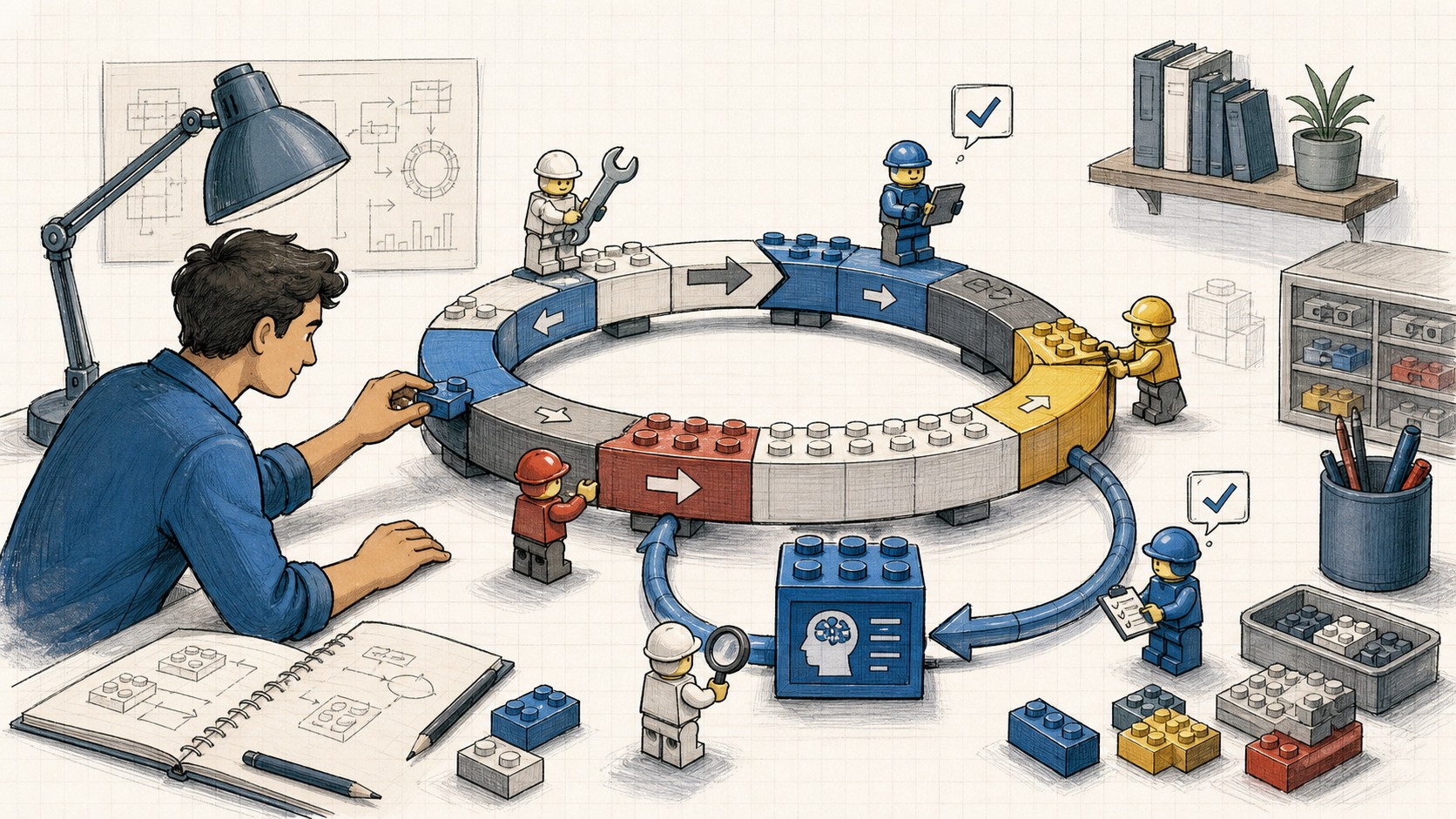
Loop Engineering: Stop Prompting Agents, Start Designing the System That Prompts Them
For two years, the way you got something useful out of a coding agent was simple: write a good prompt, share enough context, read what came back, type the next thing. The agent was a tool and you were holding it the whole time, one turn after another. You were the loop. Every cycle ran through your hands and your attention.
That part is ending. Not the thinking. The typing.
Boris Cherny, who runs Claude Code at Anthropic, put it bluntly: “I don’t prompt Claude anymore. I have loops running that prompt Claude and figuring out what to do. My job is to write loops.” Peter Steinberger said the same thing from the other side: “You shouldn’t be prompting coding agents anymore. You should be designing loops that prompt your agents.”
I’ll be honest about my skepticism up front. This is early, the token economics can swing wildly depending on whether you’re token-rich or token-poor, and the slop concern is real. But the shape of the thing is correct, and once you see it you can’t unsee it. Here’s how it works.
1. The Leverage Point Moved
Here’s the mental model. A loop is a recursive goal: you define a purpose, and the system iterates until that purpose is satisfied. You don’t drive each step. You design a small machine that finds the work, hands it out, checks it, writes down what’s done, and decides the next thing. Then you let that machine poke the agents instead of doing it yourself.
I’ve written before about the layers underneath this. Agent harness engineering is shaping the environment a single agent runs inside. The factory model is the system that builds the software. Loop engineering sits one floor above the harness: it’s the harness, but it runs on a timer, spawns helpers, and feeds itself. The agent stops being a thing you hold and becomes a thing your system operates.
The surprise is that this is no longer a tooling problem. A year ago, if you wanted a loop, you wrote a pile of bash and you maintained that pile forever. Now the pieces ship inside the products. Steinberger’s list of primitives maps almost exactly onto the Codex app, and almost the same onto Claude Code. Once you notice the shapes are identical, you stop arguing about which tool wins and you start designing a loop that survives whichever one you’re sitting in.
[!important] The work didn’t get easier. The leverage point moved. You used to spend your skill on writing the prompt. Now you spend it on designing the system that writes the prompts, and on verifying what that system ships.
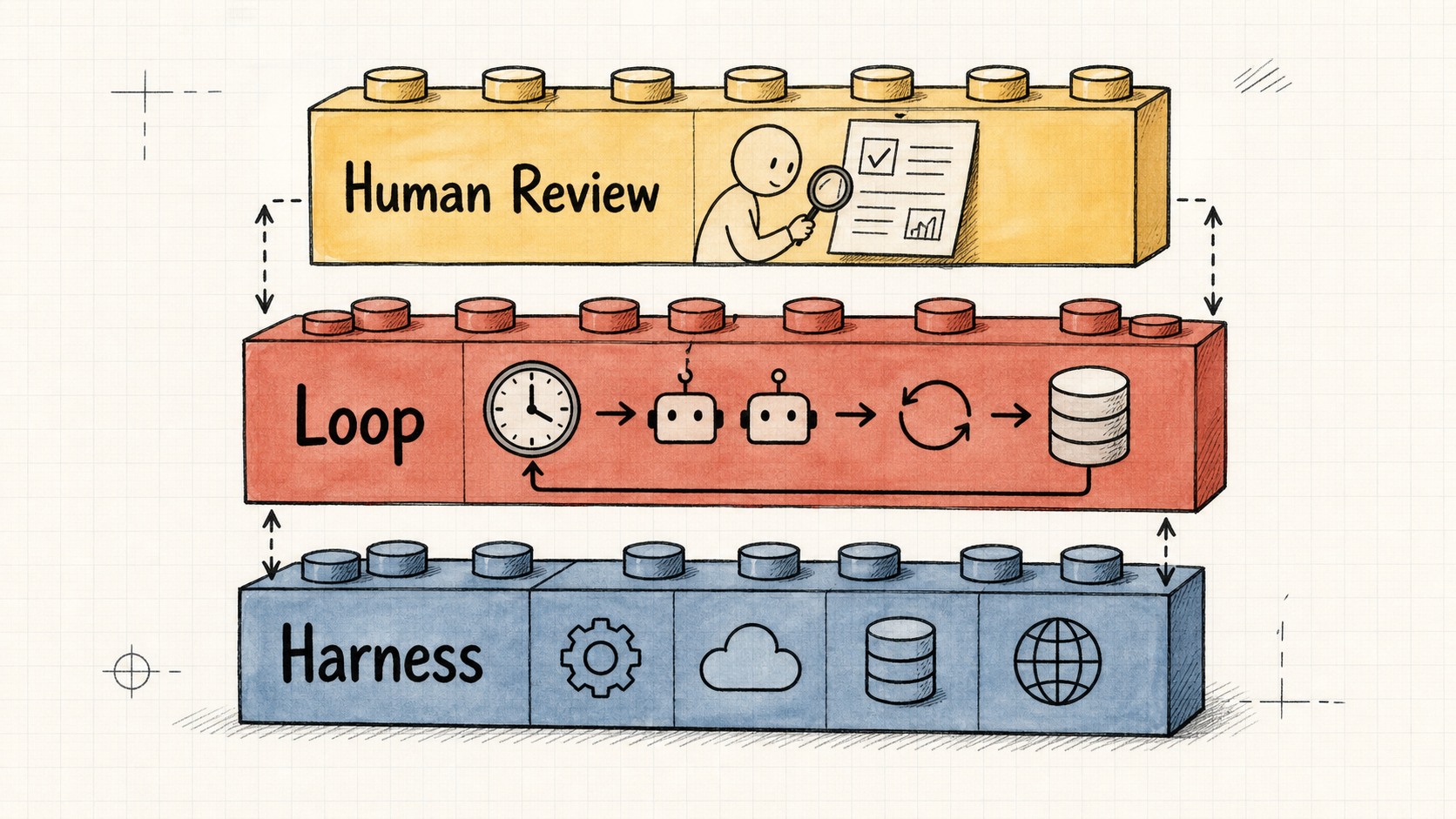
Loop engineering sits one floor above the harness: same components, but it runs on a cadence, spawns helpers, and feeds itself.
2. The Five Pieces, Plus the One That Holds It Together
A working loop needs five building blocks and one place to remember things. Both Claude Code and Codex now have all five. The names differ here and there, but the capability is the same. The details are exactly where a loop either holds together or quietly leaks everywhere.
Automations: the heartbeat
Automations are what make a loop an actual loop instead of one run you did once. They go off on a schedule and do discovery and triage by themselves.
In the Codex app you create one in the Automations tab: pick the project, the prompt, the cadence, and whether it runs on your local checkout or a background worktree. Runs that find something land in a Triage inbox; runs that find nothing archive themselves. OpenAI uses them internally for the recurring work nobody wants to babysit: daily issue triage, summarizing CI failures, writing commit briefings, hunting bugs someone added last week. An automation can also call a skill, which means you fire $skill-name instead of pasting a wall of instructions into a schedule nobody will ever maintain.
Claude Code reaches the same place through scheduling and hooks. You run a prompt or command on an interval with /loop, schedule a cron task, fire shell commands at points in the agent lifecycle with hooks, or push the whole thing to GitHub Actions so it keeps running after you close the laptop. Same idea: define an autonomous task, give it a cadence, let the findings come to you instead of going around checking.
There’s a second, in-session primitive worth knowing. /loop re-runs on a cadence. /goal keeps going until a condition you wrote is actually true, and after every turn, a separate small model checks whether you’re done. The agent that wrote the code is not the one grading it. You give it something like “all tests in test/auth pass and lint is clean,” and you walk away. Codex has the same primitive, also called /goal, with pause, resume, and clear. Same tool in both, which is the pattern for this entire topic.
This is the part that surfaces the work. The rest of the loop acts on it.
Worktrees: so parallel doesn’t become chaos
The second you run more than one agent, files start colliding, and that collision becomes the failure mode. Two agents writing the same file is the exact headache as two engineers committing to the same lines without talking first.
A git worktree fixes it. It’s a separate working directory on its own branch, sharing the same repo history, so one agent’s edits cannot touch another’s checkout. Codex builds worktree support in directly so several threads hit the same repo without bumping into each other. Claude Code gives you the same isolation: git worktree, a --worktree flag to open a session in its own checkout, and an isolation: worktree setting you attach to a subagent so each helper gets a fresh checkout that cleans itself up afterward.
But worktrees remove the mechanical collision, not you. Your review bandwidth is still the ceiling. It decides how many agents you can actually run, not the tool. I call this the orchestration tax, and it’s real.
[!warning] Worktrees let you spawn ten agents in parallel. They do not let you review ten agents in parallel. The tool scales the work; it does not scale your judgment. Spawn what you can actually verify.
Skills: so you stop re-explaining your project every session
A skill is how you stop re-explaining the same project context every session. Both tools use the same format: a folder with a SKILL.md holding instructions and metadata, plus optional scripts, references, and assets. Codex runs a skill when you call it with $ or /skills, or automatically when your task matches the skill’s description. That last part is why a tight, boring description beats a clever one. Claude Code works the same way.
Skills are where intent stops costing you every run. An agent starts every session cold, and it will fill any hole in your intent with a confident guess. That’s intent debt, and it compounds. A skill is your intent written down on the outside: the conventions, the build steps, the “we don’t do it like this because of that one incident.” Written once, in a place the agent reads on every run.
Without skills, the loop re-derives your entire project from zero every cycle. With skills, it compounds. One distinction worth keeping straight: the skill is the authoring format; a plugin is how you ship it. When you want to share a skill across repos or bundle several together, you package them as a plugin. True in Codex, true in Claude Code.
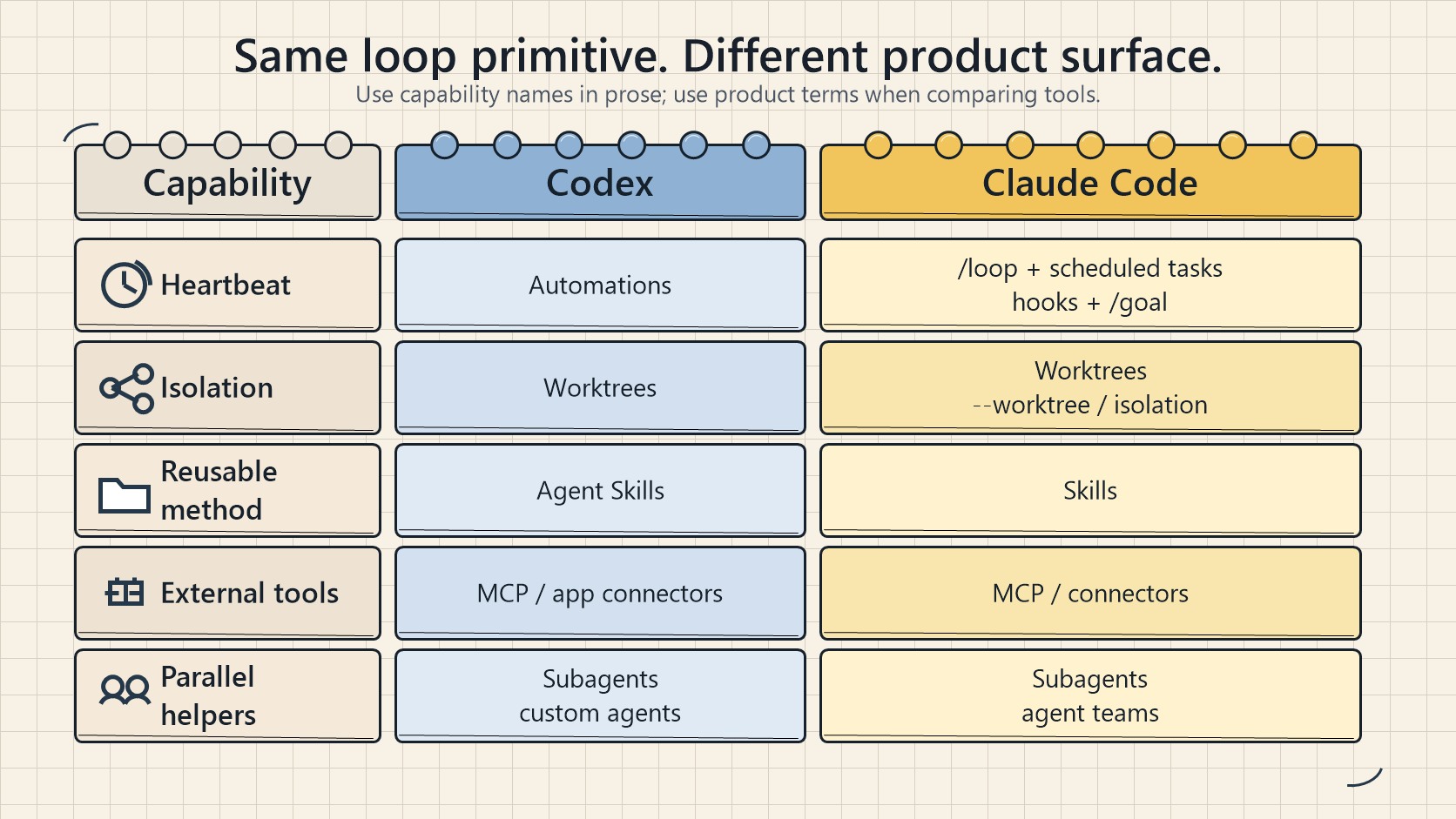
The names differ, the capability is identical. Design the loop, not the tool. It survives whichever product you’re in.
Connectors: so the loop touches your real tools
A loop that can only see the filesystem is a tiny loop. Connectors, built on MCP, let the agent read your issue tracker, query a database, hit a staging API, or drop a message in Slack. Codex and Claude Code both speak MCP, so a connector you wrote for one usually just works in the other. Plugins bundle connectors and skills together, so a teammate installs your whole setup in one go instead of rebuilding it from memory.
This is the difference between an agent that says “here is the fix” and a loop that opens the PR, links the Linear ticket, and pings the channel once CI goes green. By itself. Connectors are the reason the loop can act inside your actual environment instead of narrating what it would do if it could.
Sub-agents: keep the maker away from the checker
The single most useful structural decision in a loop is splitting the agent that writes from the agent that checks. The model that wrote the code is far too generous grading its own homework. A second agent with different instructions, sometimes a different model, catches what the first one talked itself into.
Codex spawns subagents when you ask, runs them in parallel, and folds the results into one answer. You define agents as TOML files in .codex/agents/, each with a name, description, instructions, and optional model and reasoning effort. Your security reviewer can be a strong model on high effort while your explorer is a fast, read-only thing. Claude Code does the same with subagents in .claude/agents/ and agent teams that pass work between them. The usual split in both: one agent explores, one implements, one verifies against the spec.
The reason this matters specifically inside a loop is that the loop runs while you’re not watching. A verifier you actually trust is the only reason you can walk away. Subagents burn more tokens, since each does its own model and tool work, so spend them where a second opinion is worth paying for. This is also what Claude Code’s /goal does under the hood: a fresh model decides whether the loop is done instead of the model that did the work. The maker-checker split applied to the stop condition itself.
The memory: the spine
Then the sixth thing: memory. A markdown file, a Linear board, anything that lives outside the single conversation and holds what’s done and what’s next. It sounds too simple to matter. It’s the same trick every long-running agent depends on.
The model forgets everything between runs, so the memory has to live on disk, not in the context. The loop runs. The conversation closes. The state file stays. Without it, tomorrow’s run starts from nothing and re-litigates yesterday. With one, the loop picks up exactly where it stopped.
3. What One Loop Actually Looks Like
Stick the pieces together and a single thread turns into a small control panel. Here’s a shape I keep coming back to.
An automation runs every morning against the repo. Its prompt calls a triage skill that reads yesterday’s CI failures, the open issues, and the recent commits, then writes its findings into a markdown file or a Linear board (the memory). For each finding worth doing, the thread opens an isolated worktree and sends a sub-agent to draft the fix. A second sub-agent reviews that draft against the project skills and the existing tests. Connectors let the loop open the PR and update the ticket. Anything the loop can’t handle lands in the triage inbox for me.
The state file is the spine of the whole thing. It remembers what was tried, what passed, what’s still open, so tomorrow’s run continues instead of restarting.
Now look at what you actually did there. You designed it once. You didn’t prompt a single one of those steps. That’s Steinberger’s whole point made concrete, and it’s the same loop whether you build it in Codex or Claude Code, because the pieces are the same pieces.
[!quote] “I don’t prompt Claude anymore. I have loops running that prompt Claude and figuring out what to do. My job is to write loops.” — Boris Cherny, Claude Code at Anthropic
4. What the Loop Will Never Do for You
The loop changes the work. It does not delete you from it. Three problems get sharper as the loop gets better, not softer.
Verification is still on you. A loop running unattended is also a loop making mistakes unattended. The entire reason you split the verifier subagent from the maker is to make the loop’s “it’s done” mean something. Even then, “done” is a claim, not a proof. The line I keep repeating: your job is to ship code you confirmed works. Not code an agent told you works.
Your understanding rots if you let it. The faster the loop ships code you didn’t write, the wider the gap between what exists and what you actually understand. That’s comprehension debt, and a smooth loop grows it faster unless you read what the loop made. The friction you removed was the same friction that kept you current with your own codebase.
The comfortable posture is the dangerous one. When the loop runs itself, it’s tempting to stop having an opinion and just take whatever comes back. That’s cognitive surrender. And here’s the trap: designing the loop is the cure when you do it with judgment, and the accelerant when you do it to avoid thinking. Same action. Opposite result. The loop doesn’t know which one you’re doing. You do.
[!warning] Two people build the identical loop and get opposite outcomes. One uses it to move faster on work they understand deeply. The other uses it to avoid understanding the work at all. The tooling is neutral. The intent is not.
5. Build the Loop. Stay the Engineer.
This is a preview of how the work evolves, and I think it’s mostly the right direction. But I’ll tell you exactly where I land after running these patterns myself: if I weren’t reviewing the code, or if I relied entirely on automated loops to fix things, my product’s quality would degrade. I’d dig myself into a hole and keep digging, one unreviewed merge at a time.
So set up your loops. Design the automation, write the skills, split the maker from the checker, give it a memory on disk. But don’t forget that prompting your agents directly is still effective for a huge amount of work. This isn’t a migration away from prompting. It’s a second gear. The skill is knowing which one you’re in.
Loop design is harder than prompt engineering, not easier. That’s the part the headlines miss. A prompt fails loudly and immediately. A badly designed loop fails quietly, over hours, while you’re not looking, and hands you a confident “done” on work nobody actually checked. Cherny’s point was never that the work got easier. The leverage moved, and leverage cuts both ways.
Build the loop. But build it like someone who intends to stay the engineer, not just the person who presses go.