Vibe Coding: What AI Won't Tell You Before Building Your First App
There’s a conversation happening thousands of times a day around the world. It goes something like this:
“Hey Claude, I need you to build me a YouTube-like application but without bugs.”
And the [[AI]] responds happily, generates code, and the user thinks they’ve just hired an engineering team for $20 a month. Three weeks later, the application has 47 bugs, nobody knows why login fails on Tuesdays, and the creator can’t change a button color without breaking the payment system.
This isn’t a failure of AI. It’s a failure of human architecture.
This is the manual you wish you’d read first.
The Origin of the Problem: What is [[Vibe Coding]] and Why It Seduces You
In February 2025, Andrej Karpathy—former AI director at Tesla and OpenAI—coined the term “Vibe Coding”. The idea was almost magical: you go with the flow, describe what you want in natural language, and AI builds your application while you sip coffee.
And it works. For weekend prototypes, small scripts, and client demos, Vibe Coding is extraordinarily efficient.
The problem appears when you try to scale. Real production software doesn’t forgive improvisation. When your codebase reaches 10,000 lines and the AI agent has no context of what it built last week, things collapse in spectacular ways.
That’s why, by 2026, the industry evolved toward what Karpathy himself rebranded as [[Agentic Engineering]]. The shift is conceptual but has enormous practical implications:
- Agentic: 99% of the time you’re no longer writing code yourself. You orchestrate AI agents to do it.
- Engineering: Requires rigorous quality control, prior architectural design, and constant human auditing. Natural language became a formal programming language demanding precision.
You are the architect. AI is your construction crew. And as any good architect knows: if you don’t understand the materials, you can’t design the blueprints.

The difference between ‘making it work’ and building something that lasts.
How AI Thinks (And Why It Matters)
Before directing your synthetic copilot, you need to understand its mechanical limitations. An [[LLM]] doesn’t reason like a human. It’s a probability-based predictive engine.
The Currency of AI: Tokens
AI doesn’t process whole words, but fragments called “tokens”. Basic math: 100 tokens ≈ 75 words.
Every time you send something to AI, there’s a cognitive cost. If you send a 5,000-line code file to change a button, you’re wasting thousands of tokens. Result: AI becomes slow, expensive, and prone to losing its edge.
The Context Window: Short-Term Memory
Modern models like Claude or GPT-4o have immense context windows, but they’re not infinite. If you saturate that window with irrelevant files, AI suffers from amnesia: it forgets initial instructions, ignores critical business rules, and starts inventing solutions.
[!important] The Engineer’s Rule Give AI strictly the files it needs for the specific task. Less noise = greater precision. It’s the difference between handing a surgeon the right scalpel or dumping the entire instrument tray on them.
Hallucinations: Ghost Code
Sometimes AI generates code that looks perfect but invents functions or uses libraries discontinued three years ago. The costliest mistake you can make is assuming the code works because AI said “Problem solved”.
Professional skepticism—reviewing the code AI generates—is your most valuable tool. It’s not personal distrust. It’s engineering.

Ghost code: visually perfect, functionally useless.
The Technical Fundamentals Every Architect Should Know
You don’t need to know how to write code to direct AI. But you do need to know the building materials of software, just like an architect doesn’t need to mix cement but does need to distinguish between a load-bearing wall and a partition.
Data and Its Types
Software receives information, transforms it, and returns it. AI needs you to tell it exactly what type of box to store each piece of data in:
- Strings: Text that the program won’t calculate. Names, emails, descriptions.
- Integers and Floats: Numbers. Integers for counts (5 attempts), decimals for values ($19.99).
- Booleans: Only
TrueorFalse. The on/off switch of your app.Is_user_premium? - Arrays: An ordered list of same-type elements. The list of your users’ emails.
- Objects: A file with multiple characteristics. The “User” object has name, age, active plan.
[!tip] How to Ask AI ❌ Bad Prompt: “Save the customer data.” ✅ Agentic Prompt: “Create a ‘Customer’ object with their name (String), current balance (Float), and verification status (Boolean). Group all customers in an Array.”
State: The Living Memory of Your App
This is the concept where 90% of beginners fail. “State” is the snapshot of how your application looks at this exact millisecond.
Think of the scoreboard at a basketball game. If the board goes dark, players keep scoring but nobody knows who’s winning. In your app, State protects that information.
- Local State: Only affects one part of the screen. Is the menu open or closed?
- Global State: The entire application needs it. Who’s logged in? What’s in the cart?
Logic and Control Flow
Software is dumb by nature. It doesn’t know what to do without a roadmap:
- Conditionals (If/Else): “If the password is correct, enter the system. If not, show error.”
- Loops: “Take this profile card template and repeat it for every user in the database.”
The golden rule: Don’t Repeat Yourself (DRY). Never ask AI to write 5,000 blocks of code for 5,000 users.
Three-Layer Architecture
For your app to be more than a local toy, it needs three layers:
- Frontend (The Facade): What the user sees. Buttons, colors, animations. React, Next.js, HTML. Never store secrets here. Everyone can inspect it.
- Backend (The Brain): The user can’t touch it. It receives requests, verifies permissions, processes data, and decides what to return.
- Database (The Warehouse): Where information lives permanently. If the server goes down, data stays here.
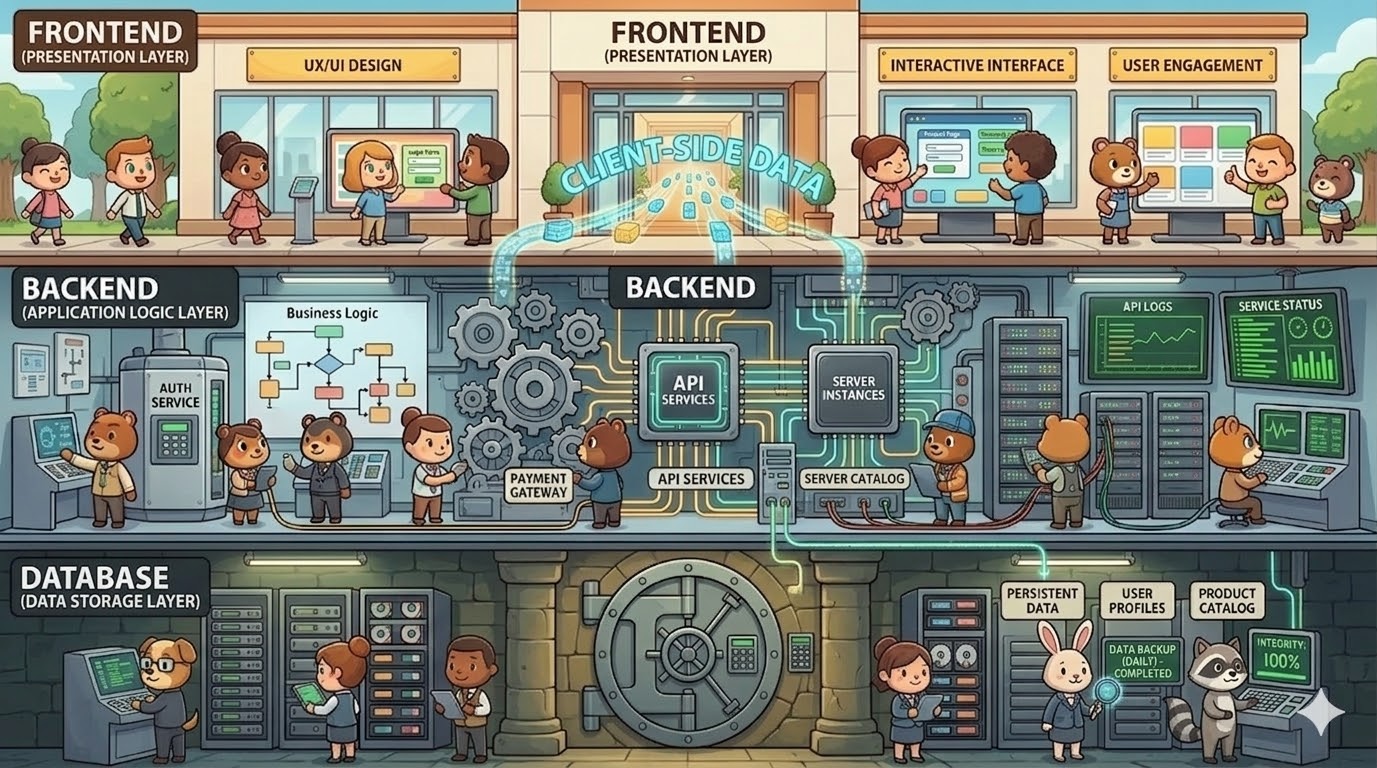
Every real application lives in three layers. Which is which matters.
APIs: The Messengers
If Frontend and Backend are separated, how do they communicate? Through APIs (Application Programming Interfaces).
Imagine a restaurant: you (Frontend) can’t go into the kitchen (Backend). The waiter (API) takes your order and brings the response. The language these messengers speak is JSON—the universal English of machines.
Modularity: The Lego Method
If you try to build an entire app in one file, modern AIs get indigestion. Claude has indigestion with spaghetti code. If you give it 2,000 lines, it will lose context, break things that worked, and generate hallucinations.
The solution is to visualize your app as a Lego set. The “Buy” button is an independent piece. The navigation bar is another. Each lives in its own small file (30-50 lines).
[!tip] The Lego Rule ❌ Bad Prompt: “Write all the code for the Admin Dashboard.” ✅ Agentic Prompt: “Let’s go modularly. Right now ONLY create
Sidebar.jswith the side menu. Confirm when you’re done so we can move to the next piece.”
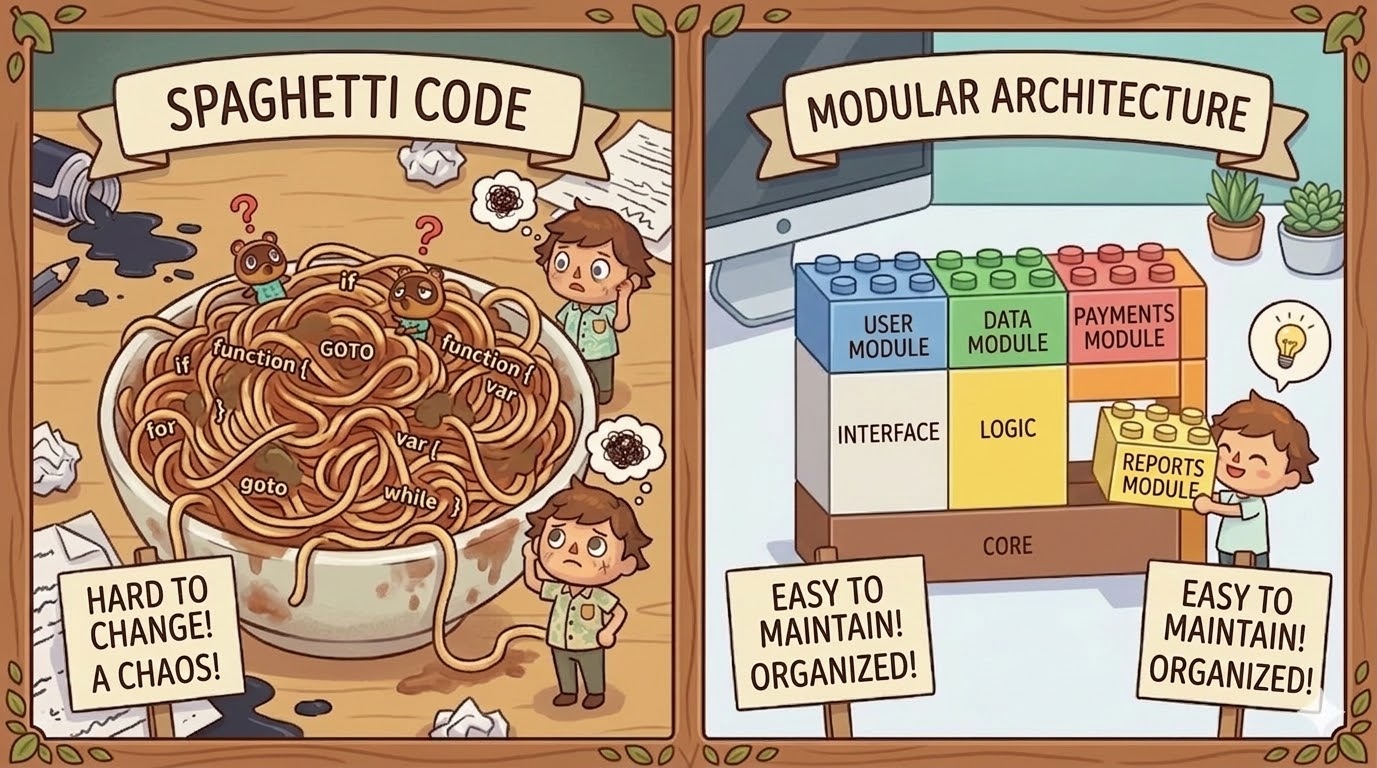
Spaghetti code vs modular architecture. One scales; the other doesn’t.
The Tool Ecosystem (2026)
Copy-pasting from ChatGPT is an obsolete practice. The ecosystem splits into three categories:
Full-App Builders (For Quick Prototypes)
- Lovable: You enter a prompt and in minutes you have a complete web app with database and authentication. Perfect for validating ideas with stakeholders.
- Bolt.new: Applications that run straight in your browser without local servers. Lightning-fast for demos.
They’re perfect for controlled Vibe Coding. The problem is that as the app grows, these platforms limit you.
Agentic IDEs (The Professional’s Environment)
For complex and scalable applications:
- Cursor: The industry standard. Its “Composer” mode modifies multiple files simultaneously. You review the diffs and approve.
- Windsurf: Stands out for its “Cascade” agent that understands deep project context, executes terminal commands, and corrects errors almost autonomously.
Terminal Agents
- Claude Code / Aider: Live in the command line. You tell them “find out why tests are failing and fix it” and the agent navigates your folders and rewrites code automatically.
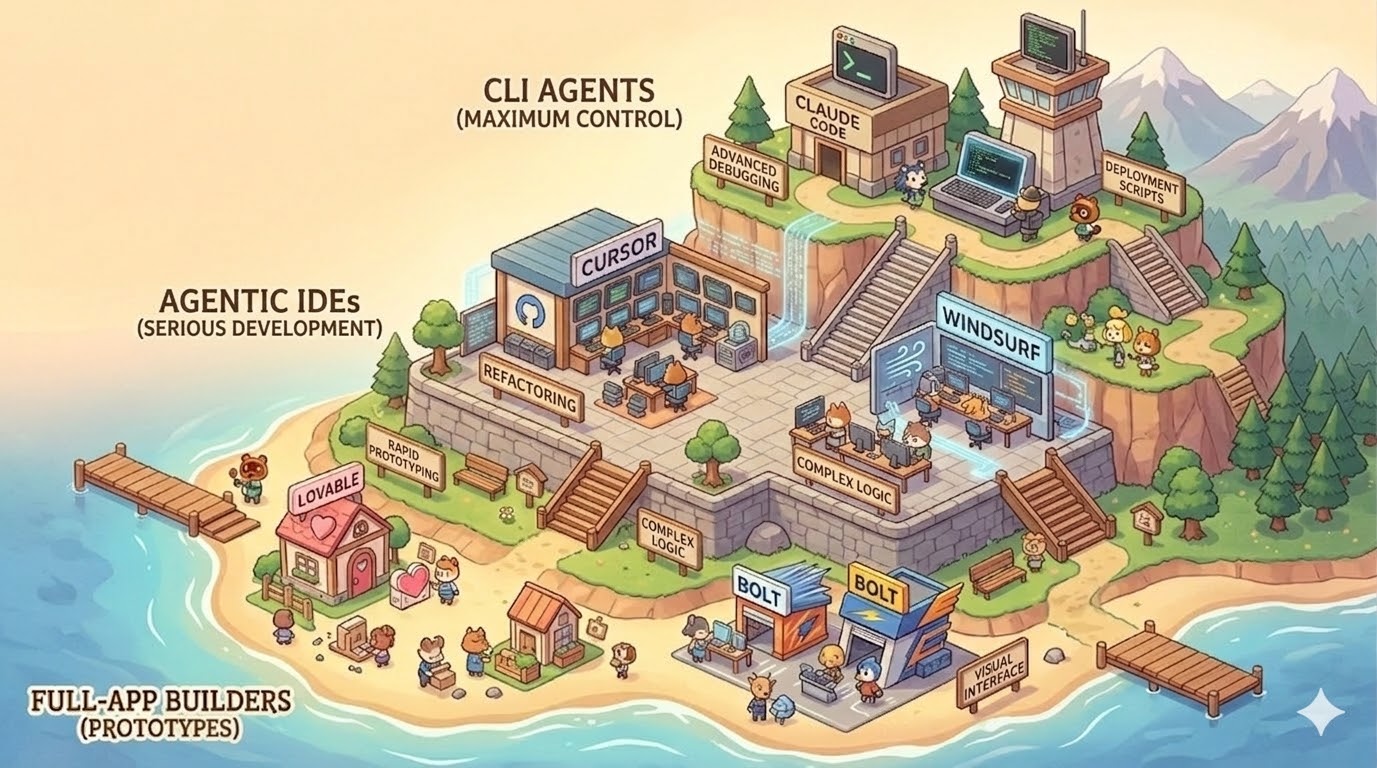
The agentic tool ecosystem in 2026. The right level for each stage.
Prompt Engineering (The Difference Between Amateurism and Precision)
A novice prompt (“make a Spotify clone”) produces disaster. An AI engineer uses structured specifications.
The Anatomy of the Perfect Prompt
- Role and Objective: “You are a Senior Full-Stack engineer. Your task is to build the billing module.”
- Tech Stack: “Use strictly Next.js, TypeScript, Tailwind CSS, and Supabase.”
- Business Rules: “If the invoice exceeds $10,000, it goes into ‘Pending Audit’ status.”
- Constraints: “Don’t use external libraries for dates. Separate business logic from UI.”
Chain of Thought: Demand a Plan First
[!warning] The Golden Rule Never allow AI to start writing code immediately on a complex problem.
Always use this defensive prompt: “Before writing code, make a numbered plan of how you’ll structure this, what patterns you’ll use, and what files you’ll create or modify. Wait for my approval before proceeding.”
This single step saves you hours of debugging.
Security — Your Human Responsibility
[!important] The Human as Auditor AI is a brilliant programmer but incredibly naive. Its goal is to make code work fast, not secure. An autonomous agent will publish your database password on the internet if it means getting the app running. You are the security auditor.
Environment Variables: The Post-it Under the Desk
Your app needs secrets: database passwords, Stripe keys, OpenAI tokens. Never write them directly in the code.
An Environment Variable is like writing on page 45 of a book: “The protagonist used the password the owner has on a post-it under his desk.” That post-it is your .env file. It only exists on your computer. It never goes on the internet.
The protection: a .gitignore file tells your system “upload all my code to the cloud, except the .env.”
The Wallet-Destroying Mistake: Secrets in the Frontend
[!danger] The Financial Disaster The Frontend runs on every user’s computer. If you put your secret AWS key there, you’re physically sending it to everyone. Bots are scanning the internet 24/7. If they find your exposed AWS key, in less than 5 minutes they’ll create thousands of servers in your name to mine cryptocurrency. You’ll wake up to a $50,000 USD bill.
Frameworks like Next.js have prefixes like NEXT_PUBLIC_. If AI suggests NEXT_PUBLIC_STRIPE_SECRET_KEY, reject it immediately. That prefix tells the system: “show this secret to the entire internet.”
The only real solution: the server as intermediary. Frontend talks to your Backend. Your Backend has secrets in its private .env. Your Backend talks to OpenAI or Stripe. The user never sees the key.
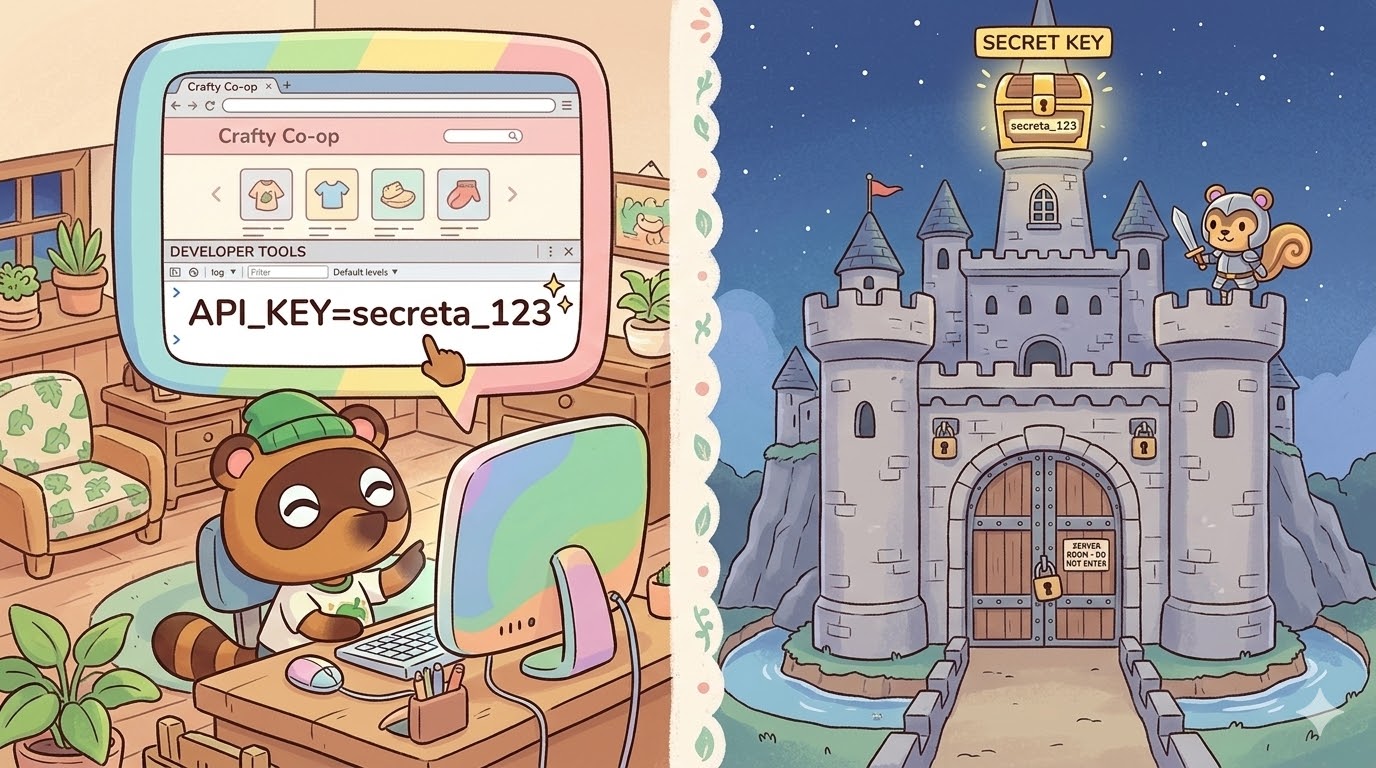
Frontend vs Backend: one is a storefront; the other is a vault.
The Defensive Audit Prompt
Before publishing anything, use this prompt:
“Act as a Security Auditor. Review all my Frontend components and tell me if there’s any possibility that any API key, environment variable, or payment validation logic is exposed on the client side (browser).”
When Everything Breaks — The Art of Debugging
Talk About Errors with Data, Not Emotions
“The screen turned white” is useless to AI. It needs raw data:
- Open the browser console (F12 → Console) or the terminal
- Copy the complete error and Stack Trace (that red text block)
- Give context: “When I press the payment button, the console throws this error: [paste error]. Trace the path from Frontend to database and identify where it breaks.”
The Death Spiral
If AI gives a solution that generates a new error, and that generates a third error, stop. Letting AI modify 20 files trying to put out fires will destroy your architecture.
Emergency brake: If on the third attempt AI hasn’t solved it, revert your code to your last Git save. Then: “Forget the code. Explain to me conceptually why this strategy is failing and propose a completely different architectural approach.”
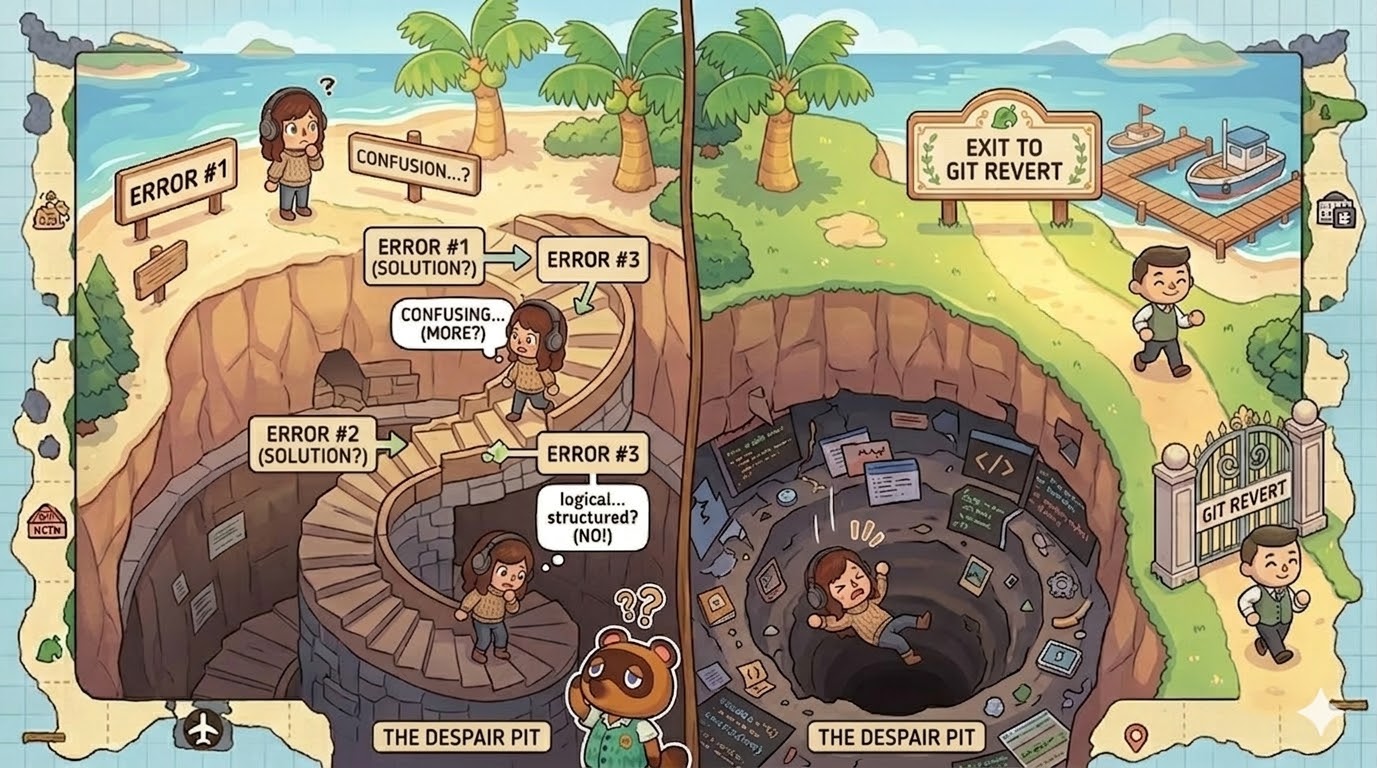
The Death Spiral. Git is your safety net.
The Profile of the Engineer of the Future
The market no longer pays you for remembering whether a command needs a semicolon. That costs fractions of a cent in AI tokens.
What actually has value:
Critical Code Reading: Knowing how to read code is ten times more valuable than knowing how to write it. When AI delivers 200 lines in seconds, your job is to scan it, audit the security, and validate whether it meets the business requirement.
Systems Thinking: AI has tunnel vision: it solves problems by isolating the current file. You must be the architect who understands the entire system. How the server sends data to the database. How they return to the interface. How the user interacts with it.
Product Mindset: By freeing you from mechanical writing, your energy reassigns to what generates real value: Does this app solve a real problem? Is the UX intuitive? What monetization model do we implement? The modern creator is a hybrid between Product Manager and Systems Architect.
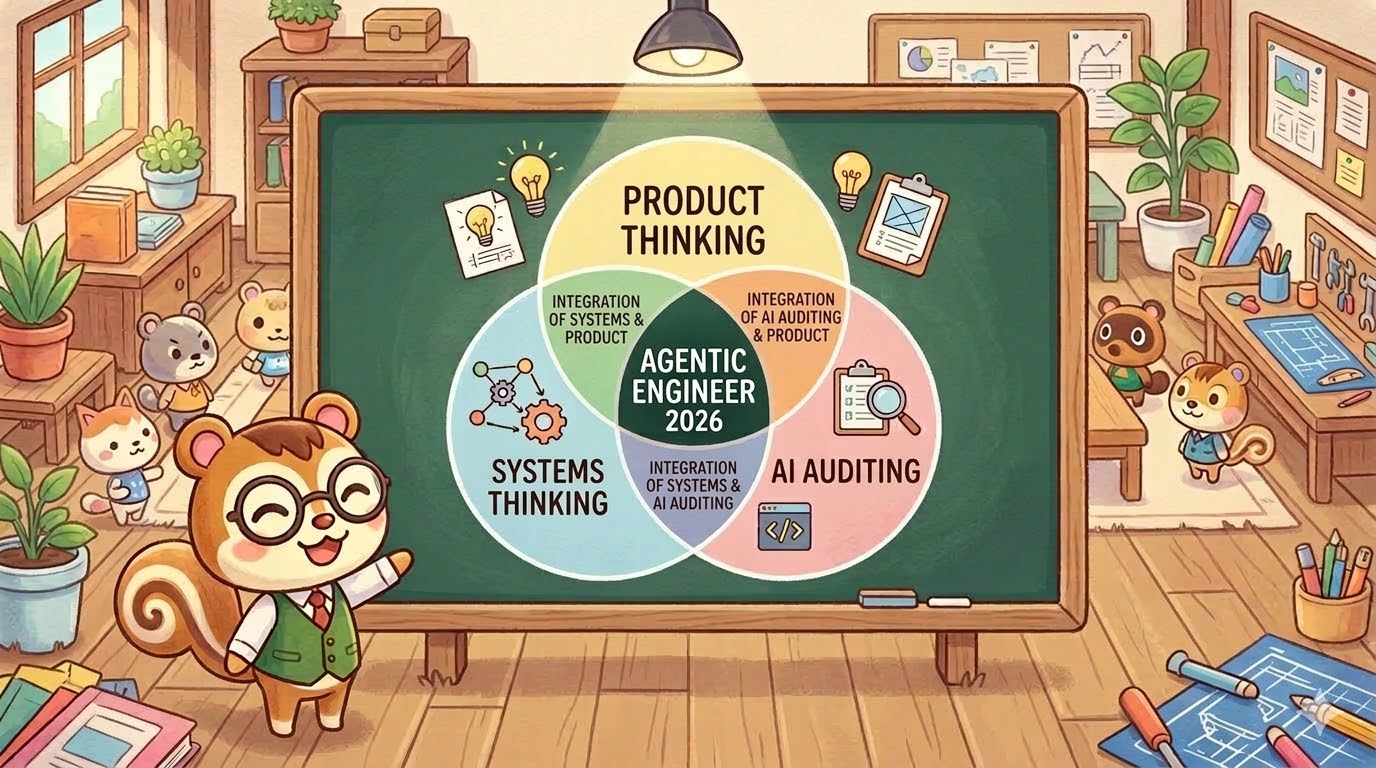
The profile of the modern creator: architect, auditor, and product strategist all at once.
The question is not whether you’ll use AI to build software. It’s already inevitable. The question is whether you’ll do it like someone asking AI “build me a flawless YouTube clone”, or like someone who understands the materials, designs the blueprints, and orchestrates the team.
The difference between the two is exactly this manual.
This article is part of the materials for the Prototyping and Product Development with AI Workshop (2026). For a deeper look at the methodology, you can also read about Spec-Driven Development.
The workshop — taught in Spanish for LATAM — goes far beyond theory: real environments with Node.js and Git, AI connected to Figma and Airtable via MCPs, a full product built from scratch and deployed to your own server with SSL and automated CI/CD. You leave with something published on the internet, not a prototype.
If you’re interested in English-language mentoring or private sessions, reach out — that’s something we can make happen.